algo
[SCDDS - Simulink Control Development & Deployment Suite] Copyright SPC-EPFL Lausanne 2022. Distributed under the terms of the GNU Lesser General Public License, LGPL-3.0-only.
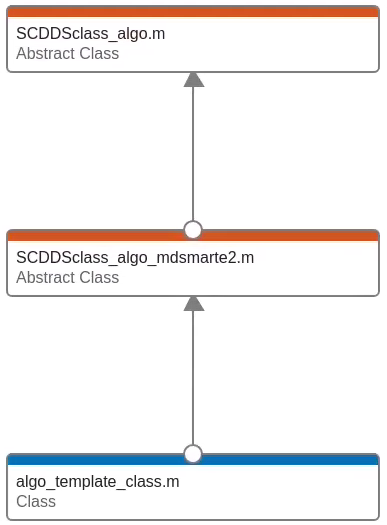
Class hierarchy: algo
- class SCDDSclass_algo
SCD algorithm handling object The class holds all information and methods for handling a Simulink algorithm
- Constructor Summary
- SCDDSclass_algo(name)
Constructor
- Method Summary
- addbus(name, source)
method to attach a bus to the algo object syntax obj = obj.addbus(‘busName’,’source_file’) OR obj = obj.addbus(‘’,@() source_file_handle()) inputs busName : (string) desired name of the bus in the sldd source : (string OR handle) file name of the bus definition script
- addfpinitfcn(fcnname, targetstruct, targetworkspace)
attaches a fixed parameter initialization function to this object syntax obj = obj.addfpinitfcn(‘function_name’,’target_structure_name’,’target_ws’) inputs fcnname : (string) name of the m-script containing the FP definition targetstruct : (string) name of desired FP in the data dict as it will be referenced by the blocks in the model slx targetworkspace : (optional, string) workspace where to put the FP (‘datadictionary’ or ???)
- addrefdd(refdd, parentalgo)
adds a secondary referenced data dictionary to this algo object syntax obj = obj.addrefdd(‘refdd.sldd’,’parent_algo_obj’) inputs refdd : (string) name of referenced data dictionary parentalgo: (string, optional), SCDclass_algo object of algo generating this data dicationary.
- addstdinitfcn(fcnhandle)
attaches a standarized initialization function to this object syntax obj = obj.addstdinitfcn(fcnhandle) inputs fcnhandle : (function_handle) handle pointing to the init fcn
- addtunparamstruct(structname, default_function, load_permissive)
attaches a tunable parameter structure to this algo object syntax obj = obj.addtunparamstruct(‘struct_name’,@param_def_fcn(),true) inputs struct_name : (string) name of the tunable param to be added
default_function : a function handle to get its default value, this function takes no arguments and must return either a struct or a Simulink.Parameter
load_permissive : (optional, bool) a boolean value, if true any failing loading attemp to this structure (via a loading function) will return a warning, otherwise an error. Default: true.
example: obj=obj.addtunparamstruct(‘SCDalgo_doublet_tp’, @()SCDalgo_doublet_loadtp());
- compile()
updates or ‘compiles’ the attached slx model (ctrl+D in Simulink) syntax obj.compile
- get_nominal_param_value(variable_name)
grabs a parameter from the sldd to allow introspection or manipulation. syntax value_out = obj.get_nominal_param_value(‘variable_name’) inputs variable_name : (string) name of the variable to be grabbed. If left empty, all available parameters are grabbed from the sldd and put into a structure
- getbuildargs()
returns build arguments specified for this algo obj syntax build_args = obj.getbuildargs
- getbuslist()
prints the buses that are attached to this algo syntax list = obj.getbuslist
- getdatadictionary()
method to grab the sldd name that is linked to this algo obj syntax sldd_name = obj.getdatadictionary
- getexportedtps()
grabs exported tunable parameter structures from the algo syntax tps = obj.getexportedtps
- getinits()
returns the std and fixed parameter inits attached to this algo object syntax [stdinits, fpinits] = obj.getinits
- getname()
returns the name of the algo obj syntax out = obj.getname
- getrefdd()
returns the secondary referenced sldds attached to this algo obj in addition to the nominal sldd. syntax refdd = obj.getrefdd
- getrefddparentalgo()
returns the parent algo obj that is the supplier of the secondary referenced sldd attached to the current algo syntax parent_algo = getrefddparentalgo
- gettiming()
returns the timing structure of this algo obj. This timing property CAN be used in the model, but is NOT automatically enforced. syntax out = obj.gettiming
- init(simconf, simconf_container)
initializes this algo object. During initialization, the following steps are performed: - put a SimulinkConfiguration set in the base WS that can be referred to in the model slx (needs to be done manually) - create a fresh new sldd - call the parameter and bus init fcns and stick their nominal values in the freshly created sldd syntax obj.init or obj.init(‘simulinkconf’,’simulinkconfsldd’)
- open()
physically opens the slx model attached to this algo object syntax obj.open
- printbuslist()
prints the attached buses in this algo object syntax obj.printbuslist
- printinfo()
prints algo obj information. Syntax obj.printinfo Inputs None
- printinits()
prints the registered fixed parameter initialization functions linked to this algo object Syntax obj.printinfo Inputs None
- setbuildargs(in)
sets the build arguments property in this algo object. These build arguments are used when calling the c/c++ compiler during code generation syntax obj = obj.setbuildargs(input_string) inputs input_string: string containing the build arguments to be set
- setdatadictionary(datadict)
overwrites the standard sldd that is linked to this algo object. syntax obj = obj.setdatadictionary(‘sldd_name.sldd’); inputs sldd_name : (string) name of the sldd to be linked, including the .sldd extension
- settiming(t_start, dt, t_stop)
method to set the timing property structure of this algo object. This property can be used later in the slx or in the FP definition to define sample times in the model. Note that this is NOT done automatically: You need to set the sample time property in model ports manually syntax obj = obj.settiming(t_start,dt,t_stop) inputs tstart : (double) simulation start time dt : (double) simulation sample time of ports (not automatically set!) t_stop : (double) simulation stop time
- setup()
method to setup the algo object. Calling this method performs the following steps: - call updatetemplatetp - call buildworkspacetpstruct (if obj.exporttptobase=1) - call buildworkspacesimdata after init+setup, an algorithm block diagram should pass ctrl+d (slx model update) syntax obj.setup
- sim()
simulates the attached simulink model, taking any input data from actualized wavegens (if available) or assuming zeros syntax obj.sim
- test_harness()
calls an attached ‘test harness’ that embeds the algo object’s slx model in a standalone environment for testing this method assumes the presence of an m-script called <algo_name>_harness_run.m that initializes/ setups the attached algo, and defines any input data that is required to run the harness model slx. The harness model slx should be named <algo_name>_harness.slx syntax obj.test_harness
- update_nominal_param_value(variable_name, value)
updates the value of a parameter in the sldd. Can be used in conjuction with get_nominal_tp_value to grab the current nominal value syntax obj.update_nominal_param_value(‘variable_name’,value) inputs variable_name : (char) name of the TP to be updated in the sldd. Nested structs leafs are also supported (e.g., tp.PIDgain) value : (Simulink.Parameter, struct, scalar, …) new value of TP
